
Most warehouse RFID programs do not fail because the technology is unreliable. They fail because the receiver, the device that actually listens for tag replies, was matched to the wrong job. Buyers routinely optimize for price or headline power numbers and discover the gaps only after tags start dropping on the floor. This article separates the recurring root causes of receiver selection failure and gives a decision tree you can apply before requesting a quote.
Choose by function, not price: a desktop unit with USB keyboard emulation handles tag encoding and data entry at 0–10 cm, while a fixed reader driving two to four antennas handles dock doors at 5–15 m. Then specify receive sensitivity near -80 dBm, a working SDK, and the right regional certification, FCC Part 15 or ETSI EN 302 208 with Listen Before Talk.
Do you need a receiver for data entry or for continuous collection?
A common mistake is treating every reading task as the same task. A powerful fixed reader at a desk is as wasteful as a desktop unit at a dock door.
The first cut is functional, not technical: a desktop unit with USB keyboard emulation handles tag issuance and data entry, while a fixed reader driving external antennas handles floor level, continuous tracking — typically 0 to 10 cm at the desk versus 5 to 15 m at the door.

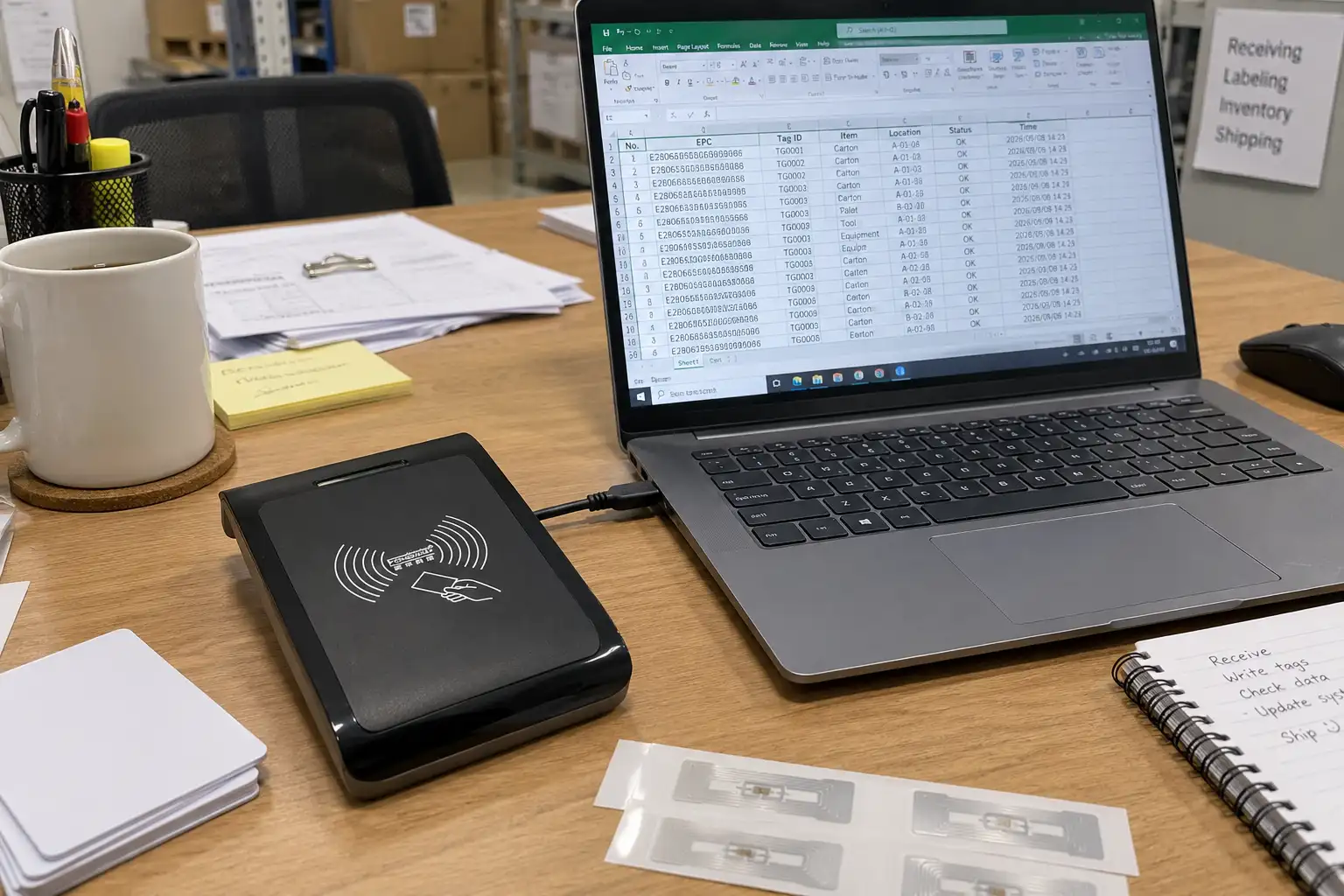
The quickest way to separate them is to ask where the work happens: at a desk, or at a door. On a bench, the desk job looks like this: plug the receiver into a USB port, open the ERP web form or a spreadsheet, click into the field where the asset ID belongs, hold a blank tag over the desktop unit, and the encoded ID lands in that field as though it had been typed. No driver to install, no middleware to license, no developer time.
The two jobs place opposite demands on the hardware. A desktop receiver for initialization is plugged into a workstation, emulates a keyboard, and writes a single tag placed in its near field. It is fast to deploy and needs no middleware. A fixed receiver lives on the network, drives two to four antennas across a portal or conveyor, and reports reads through Ethernet or GPIO to a warehouse management system. A practical breakdown:
| Factor | Data entry (desktop) | Continuous collection (fixed) |
|---|---|---|
| Primary job | Writing and initializing tags | Tracking and counting in motion |
| Connection | USB, plug and play | Ethernet, PoE, or GPIO |
| Read range | Short (0 to 10 cm) | Long (5 to 15 m) |
| Defining feature | Keyboard emulation | Multi antenna support |
Choosing the form factor before the brand avoids the most expensive error in the field: buying a desktop unit for a dock door, which saves a small amount on hardware and loses far more in missed inventory. For the desk side of the workflow, a dedicated desktop unit described in the data initialization guide removes the manual typing bottleneck. The broader tradeoffs are covered in the receiver selection guide.
Is transmit power the key to range, or is sensitivity what matters?
Spec sheets and buying conversations are dominated by dBm numbers. It is easy to assume that more transmit power equals more distance, and that a 30 dBm reader must beat a 20 dBm one.
Transmit power only pushes the signal outward; receive sensitivity decides whether the reader can hear the weak backscattered reply, and in metal heavy warehouses that sensitivity is usually the limiting factor. A -80 dBm receiver decodes replies a -60 dBm unit drops entirely.
Passive UHF tags have no battery. They power up from the reader's field and reply by reflecting a tiny amount of energy back. That return signal is faint, often near the noise floor. The reader must detect this whisper while still recovering from its own loud transmission. In a clean lab, extra transmit power does extend range. In a real warehouse packed with metal racking and foil wrapped goods, high power tends to bounce off surfaces and raise interference rather than improve reads. A receiver rated at around -80 dBm sensitivity detects tags that a cheaper unit at -60 dBm misses, especially at the edge of the read zone or behind a cardboard layer. The spec sheet worth studying is the receiver sensitivity, not the transmit ceiling. For environments where range behaves unpredictably, the range drop troubleshooting checklist isolates environment from hardware. Antenna choice and placement are explained in the large scale antenna performance guide.
Does a complete SDK and driver set decide whether your project ships?
Hardware alone arrives as a plastic box. The reader that beeps on the bench is not the reader that feeds a database, and the gap between the two is where deployments stall.
A receiver that ships without a working SDK, sample source code, and OS specific libraries forces your team to reverse engineer integration, a failure mode that stalls more deployments than faulty hardware does.
A low cost reader is ordered online, it arrives, it beeps, and then an engineer is asked to pull the tag stream into SQL or a WMS. The SDK is missing, or it is a foreign language PDF with no code. The integration now depends on trial and error, and the cost difference is measurable: an HID keyboard emulation hookup lands in about two hours, while hand writing a socket level parser against an undocumented protocol runs to roughly two engineer weeks. A professional receiver package includes callable libraries for the target environment, reference code in common languages, and drivers for the operating systems in play. On the fixed side, the reader should expose LLRP (Low Level Reader Protocol) so WMS middleware connects through a documented interface instead of reverse engineering a private one; the EPC UHF air interface and related standards are maintained by GS1. The faster path for desktop units is integration over a standard virtual COM or HID interface, which is compared in the desktop reader WMS integration guide. The deciding question for procurement is not the sticker price but the number of engineer days the vendor saves you on first connection.

Will your reader clear regional radio rules, and what does ETSI LBT require?
Radio law is easy to ignore until a shipment is stopped at the border or a site audit fails. A reader certified for one region is not automatically legal in another.
For Europe a receiver must support Listen Before Talk and meet ETSI EN 302 208, while the US follows FCC Part 15; a device certified for only one region is not legal in the other.
The UHF RFID band spans roughly 860 to 960 MHz, but each market permits only part of it. The United States uses 902–928 MHz and imposes no Listen Before Talk requirement; the European Union uses 865–868 MHz and makes it mandatory. Channel plans and the EPC UHF Gen2 air interface behind them are documented by GS1. In the United States, operation falls under FCC rules documented in 47 CFR Part 15. In Europe, the governing standard is ETSI EN 302 208, and it includes a requirement that trips up imported hardware: Listen Before Talk (LBT). LBT forces the receiver to sense whether a channel is occupied before transmitting and to wait if it is busy. This prevents the reader from colliding with other radio users. Cheap modules that simply broadcast blind are illegal in the EU and cause interference. The firmware must also be region configurable, not region locked to a single market. Confirm the regional certification in writing before purchase, because retrofitting compliance after deployment is rarely an option.
| Region | Frequency band | LBT requirement | Governing rule |
|---|---|---|---|
| United States | 902–928 MHz | Not required | FCC Part 15 (47 CFR) |
| European Union | 865–868 MHz | Mandatory, Listen Before Talk | ETSI EN 302 208 |
| United Kingdom | 865–868 MHz | Mandatory, Listen Before Talk | ETSI EN 302 208 via Ofcom |
| Other markets | Country specific allocation | Verify before shipment | National radio regulator |
A practical receiver selection decision tree
With the root causes framed, the selection itself becomes a sequence of yes or no questions. Work through them in order, because each answer constrains the next.
- What is the primary job? If the task is encoding, issuing, or single tag lookup at a desk, choose a desktop receiver with keyboard emulation. If the task is counting or tracking moving goods, choose a fixed network receiver with external antennas. This single answer eliminates most of the field.
- What is the environment made of? Metal racking, liquids, and foil shift the bottleneck to receive sensitivity and antenna placement. Specify a low sensitivity floor (around -80 dBm) and plan antennas with the large scale antenna guide. If reads are already unreliable, run the range troubleshooting checklist before buying more hardware.
- What system must it feed? Name the target OS and the backend (ERP, WMS, or a custom database). Require a matching SDK and sample code in the receiver selection guide shortlist. For desktop to WMS flows, decide HID versus virtual COM early using the integration comparison.
- Where will it operate? Confirm the required regional certification (FCC Part 15 for the US, ETSI EN 302 208 with LBT for the EU) and that the firmware is configurable for it.
- How many read points now, and later? One portal needs a four port fixed receiver. Many zones need multi port multiplexing to share reader channels cost effectively.
- Is this part of a larger rollout? If the receiver feeds a site wide program, align it with the enterprise asset tracking build plan and the handheld versus fixed reader decision so the form factors stay consistent.
Answering these six questions removes most of the guesswork that produces failed pilots. The decision tree is deliberately boring, because receiver selection is an engineering choice, not a gamble.
FAQ
Q: What is the difference between an RFID reader, a receiver, and a scanner?
A: In UHF practice the terms overlap. The reader is the full device; the receiver is the radio half that decodes tag replies; a scanner usually implies a handheld that both reads and may write. For procurement, the useful distinction is fixed versus desktop form factor, not the label on the box.
Q: How many antennas does a warehouse fixed receiver need?
A: A single portal typically uses two antennas to cover both sides of a pallet, while a four port receiver supports two portals or one wide gate. Coverage gaps, not port count, cause missed reads, so plan antenna positions before assuming you need more ports. See antenna performance at scale.
Q: Can one receiver model serve both desktop encoding and dock door tracking?
A: No. Desktop encoding needs short range, USB, and keyboard emulation; dock door tracking needs network connectivity and external antennas. Forcing one device into both roles produces a compromised result at each end. Keep the two jobs on separate hardware.
Q: What does -80 dBm receive sensitivity mean in practice?
A: It is the weakest tag reply the receiver can still decode. A lower (more negative) number means it hears fainter signals, so tags at the edge of the field or partially shielded still register. This matters far more in cluttered warehouses than a few extra dBm of transmit power.
Conclusion
Receiver selection failure is almost never a hardware defect. It is a mismatch between the device and the job, discovered too late. Define the function first, weigh sensitivity over transmit power, insist on a real SDK, and confirm regional compliance before you buy. When you have the answers from the decision tree above and need a receiver shortlist matched to your environment, contact Fongwah.